
1Password

- Travel Mode security
- Secret key protection
- Watchtower breach alerts
- Secure vault sharing
- Cross-platform syncing
Dashlane

- Built-in VPN protection
- Dark web monitoring
- Password health checker
- Autofill login details
- Secure notes storage
Bitwarden

- Open-source security
- End-to-end encryption
- Self-hosting option
- Unlimited password storage
- Cross-device sync
If you’re running a SaaS company — or managing security for one — you already know that credential chaos is one of the fastest ways to end up on the wrong side of a breach report.
Your team is spinning up new tools every week, sharing login credentials in Slack threads (we’ve all seen it), and using “Company@123” across half your stack. That’s not a vibe anyone wants heading into a SOC 2 audit.
The good news? The three best password manager for business at the top of every business shortlist — 1Password, Dashlane, and Bitwarden — have all matured significantly in 2026.
The less great news? They’re genuinely different products with different philosophies, pricing structures, and feature depth.
Picking the wrong one for your team could mean paying for features you’ll never use, or missing the ones you desperately need.
This guide breaks it all down: real pricing (checked directly from each product’s website), a feature-by-feature head-to-head, and a clear recommendation based on your SaaS team’s actual situation. No fluff, no filler — just the stuff that helps you make the call.
Why SaaS Companies Have a Unique Password Problem
Before we get into the comparison, it’s worth acknowledging that SaaS businesses face a credential challenge that’s a bit different from, say, a law firm or a retail chain.
Your team lives in the browser. You’re running dozens of tools — Notion, Linear, Vercel, AWS, Stripe, Figma, Intercom, and the list keeps growing.
Many of those tools sit outside your SSO umbrella because either the free plan doesn’t support it or someone signed up independently.
That’s the infamous shadow IT problem, and it’s particularly acute in fast-growing SaaS teams where individual contributors spin up subscriptions before IT even knows they exist.
According to the Verizon 2025 Data Breach Investigations Report, stolen credentials were the number one breach vector in 2025 — appearing in over 53% of all data breaches worldwide.
The average cost of a single credential-related breach has crossed $5 million. And yes, that stat includes companies just like yours.
For SaaS teams operating in a browser-first, app-heavy environment, a robust password manager isn’t a nice-to-have — it’s foundational security infrastructure.
Here’s the other thing: in 2026, the best password managers have evolved well beyond storing passwords.
They’re now managing passkeys, integrating with your identity provider via SSO and SCIM, surfacing credential risk scores, and — in the case of 1Password — even monitoring whether the devices your team is using are up to security standards. The feature gap between the top and bottom of this market has widened dramatically.
The Contenders: A Quick Introduction
1Password
1Password is the premium, full-featured option. Trusted by over 180,000 businesses, it’s evolved into what the company calls an Extended Access Management (EAM) platform — meaning it covers passwords, passkeys, device trust, SaaS app discovery, and developer secrets.
If you want one platform that does the most, this is the one.
Dashlane
Dashlane is the security-forward, enterprise-grade option. Its standout is Confidential SSO — a technically sophisticated approach to zero-knowledge encryption that runs key management inside AWS hardware enclaves.
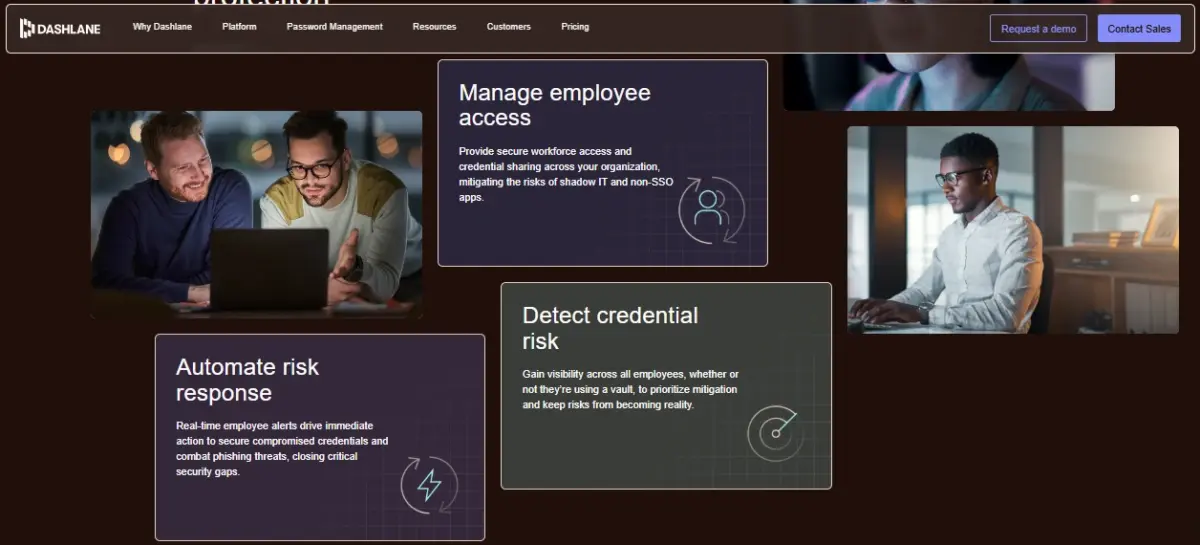
Its newer Omnix platform also brings AI-powered phishing detection and real-time credential risk alerts. If your CISO loves acronyms and your audit team loves documentation, Dashlane speaks their language.
Bitwarden
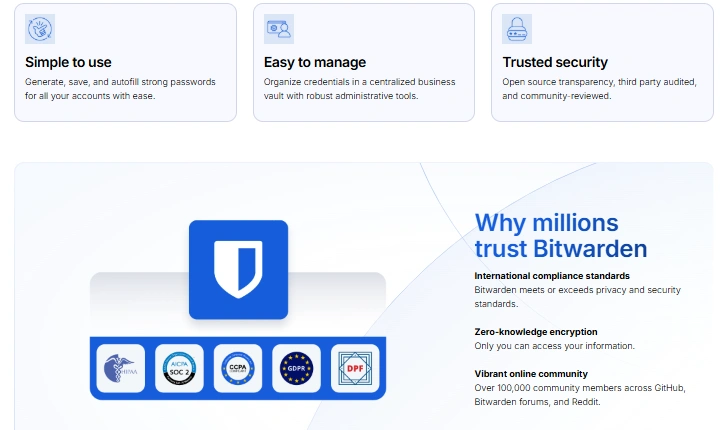
Bitwarden is the open-source, budget-conscious option. At roughly half the price of its competitors, it offers strong enterprise features, full self-hosting capability, and a codebase that anyone can audit.
If your team is developer-heavy, security-conscious, and budget-aware, Bitwarden hits a sweet spot that the others simply can’t match on price.
Pricing in 2026: What You’ll Actually Pay
Let’s get this out of the way early because pricing is often the first filter — and all three tools have updated their pricing in 2026.
1Password Pricing
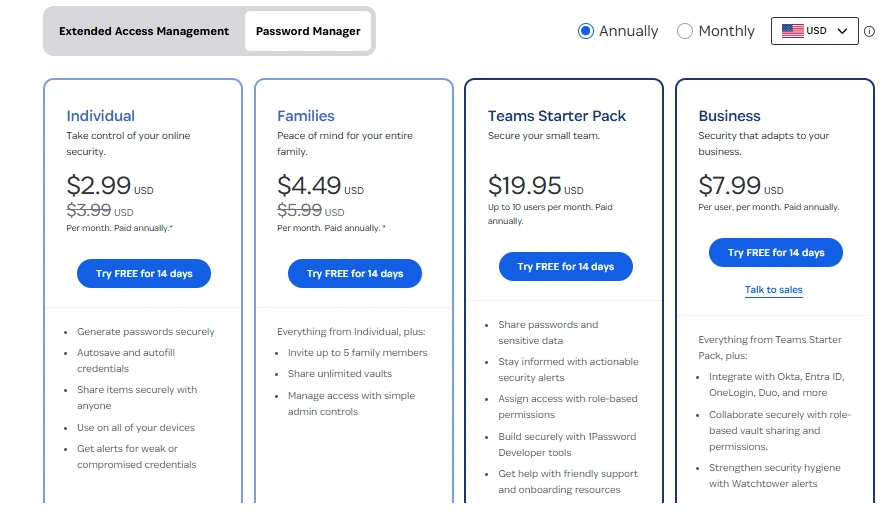
1Password runs three business tiers. The Teams Starter Pack costs $19.95/month for up to 10 users (billed annually), which makes it a solid pick for early-stage startups.
The Business plan is $7.99/user/month (billed annually) and unlocks SSO integration, SCIM provisioning, advanced reporting, custom groups, and 20 guest accounts — essentially everything a scaling SaaS company needs.
Enterprise pricing is custom and targeted at organizations with 101+ users needing dedicated Customer Success Managers and bespoke onboarding.
One genuinely nice perk: every user on the Business plan gets a free 1Password Families account for personal use, which is a surprisingly good team retention benefit.
Dashlane Pricing
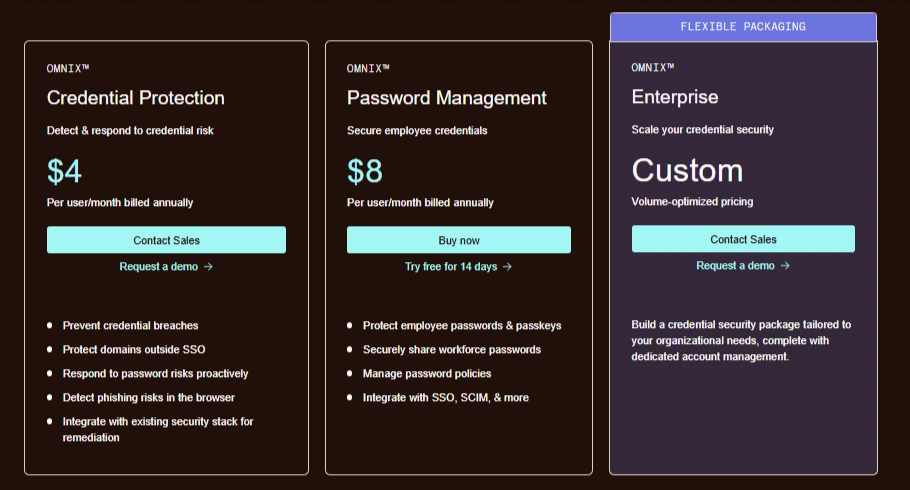
Dashlane offers flexible Omnix™ pricing plans designed to help businesses secure credentials, prevent breaches, and scale security as they grow.
🔹 Omnix™ Credential Protection – $4/user/month (billed annually)
This plan focuses on preventing credential-based threats before they happen. It helps detect and respond to credential risks, protects domains outside SSO, and proactively manages password vulnerabilities. It also includes browser-based phishing detection and integrates seamlessly with your existing security stack for faster remediation.
🔹 Omnix™ Password Management – $8/user/month (billed annually)
Ideal for teams looking to securely manage employee credentials. This plan allows businesses to protect passwords and passkeys, securely share access across teams, enforce password policies, and integrate with tools like SSO and SCIM. It also comes with a 14-day free trial for testing.
🔹 Omnix™ Enterprise – Custom Pricing
Built for large organizations, this plan offers a fully customizable credential security solution. Pricing is volume-based, and businesses get tailored packages along with dedicated account management to meet their specific security needs.
Enterprise pricing is fully custom. Worth noting: Dashlane discontinued its free plan in late 2025, so there’s no trial-without-card-details option anymore.
Bitwarden Pricing
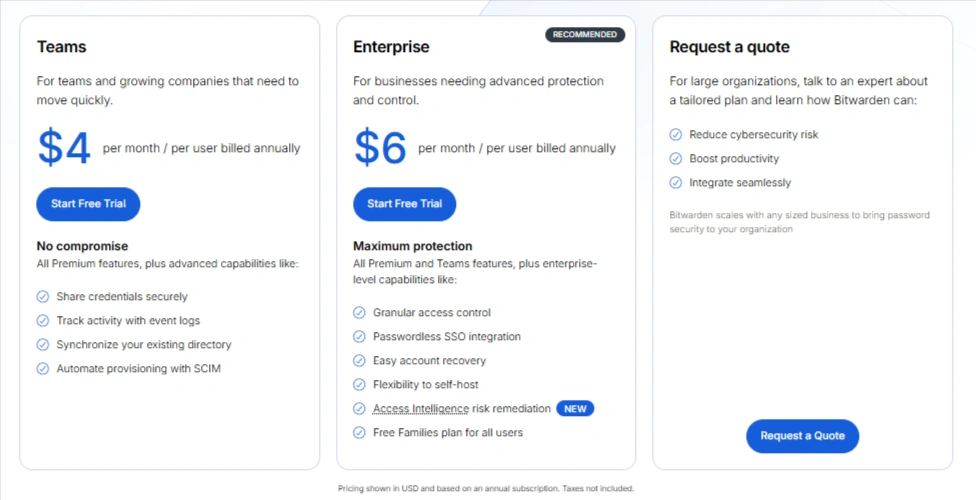
Bitwarden is where things get dramatically more affordable.
The Teams plan is $4/user/month (billed annually), and the Enterprise plan is $6/user/month — that’s it.
For a 25-person SaaS team, you’re looking at roughly $1,800/year on Bitwarden Enterprise versus $2,397 on 1Password Business.
Over three years, that gap compounds into meaningful budget. The Enterprise plan includes SSO, SCIM provisioning, advanced policy enforcement, access reports, and priority support.
A free trial is available for both tiers.
Head-to-Head Feature Comparison
Security: Who Protects Data Better?
All three — 1Password, Dashlane, and Bitwarden — use strong AES-256 encryption and a zero-knowledge model. This means even they can’t see your data.
- 1Password adds a unique Secret Key, giving extra protection even if your password is stolen. It also blocks phishing tricks like pasted logins.
- Dashlane uses secure cloud enclaves to protect encryption keys, offering very strong technical security.
- Bitwarden is open-source, so anyone can check its code. It also allows self-hosting for full control.
Verdict: All are secure. 1Password is best for daily protection, Dashlane for advanced security, Bitwarden for transparency.
SSO & SCIM (Team Access Control)
- 1Password offers easy SSO setup and a hosted SCIM, so no extra server needed.
- Dashlane provides secure SSO with added encryption protection and flexible setup.
- Bitwarden supports the most integrations and even lets you control encryption keys yourself.
Verdict: All are strong. 1Password is easiest, Dashlane is most secure, Bitwarden gives most control.
Admin Controls & Monitoring
- 1Password gives detailed reports, device security checks, and detects shadow IT apps.
- Dashlane focuses on real-time alerts and sends instant warnings to employees.
- Bitwarden covers essentials like reports and access control but is less advanced.
Verdict: 1Password has the most features, Dashlane is best for real-time alerts, Bitwarden is solid but simpler.
Passkey Support
- 1Password lets teams store and share passkeys easily.
- Dashlane protects passkeys with advanced cloud security.
- Bitwarden supports Windows login and cross-platform passkey use.
Verdict: All are excellent. Each has a different strength.
Developer & DevOps Tools
- 1Password offers the best tools (CLI, SSH keys, CI/CD, secrets management).
- Dashlane has limited developer features.
- Bitwarden supports CLI and self-hosting, good for developers.
Verdict: 1Password wins, Bitwarden is second, Dashlane is limited here.
Compliance & Audits
- 1Password is audit-ready with strong reporting.
- Dashlane offers encrypted audit logs and SIEM integration.
- Bitwarden supports compliance and allows data to stay in your own servers.
Verdict: All meet standards. Bitwarden is best for data control, Dashlane is most innovative.
Ease of Use
- 1Password is the easiest and most user-friendly.
- Dashlane is simple and helps users improve security with alerts.
- Bitwarden is reliable but less polished for beginners.
Verdict: 1Password leads, Dashlane is close, Bitwarden needs more effort for non-tech users.
The Full Head-to-Head Scorecard
| Category | 🏆 1Password | 🔵 Dashlane | 🟢 Bitwarden |
| Business Pricing (per user/mo) | $7.99 (Business) | $8.00 (PM) / $11.00 (Omnix) | $4.00 (Teams) / $6.00 (Enterprise) |
| Teams Entry Price | $19.95/mo (up to 10 users) | Contact sales | From $4/user |
| Free Trial | 14 days | Available | Yes |
| SSO Integration | ✅ OIDC (PKCE) | ✅ SAML 2.0 (Enclave) | ✅ SAML 2.0 + OIDC |
| SCIM Provisioning | ✅ Hosted bridge | ✅ Enclave-backed | ✅ SCIM + Directory Connector |
| Passkey Support | ✅ Full + Sharing | ✅ Enclave-secured | ✅ Full + Windows 11 |
| Self-Hosting | ❌ | ❌ | ✅ |
| Open Source | ❌ | ❌ | ✅ |
| Device Trust | ✅ (via Kolide) | ❌ | ❌ |
| Developer Tools (CLI/SSH/CI-CD) | ✅ Deep | ⚠️ Basic | ✅ Good |
| Shadow IT Discovery | ✅ | ❌ | ❌ |
| AI/Phishing Alerts | ✅ | ✅ (Omnix tier) | ⚠️ Basic |
| Dark Web Monitoring | ✅ | ✅ | ✅ |
| SIEM Integration | ✅ | ✅ (Omnix tier) | ✅ |
| SOC 2 Type II | ✅ | ✅ | ✅ |
| ISO 27001 | ✅ | ✅ | ✅ (since 2025) |
| Ease of Use | ⭐⭐⭐⭐⭐ | ⭐⭐⭐⭐½ | ⭐⭐⭐½ |
| Free Families Plan for Users | ✅ (Business+) | ❌ | ✅ (Enterprise) |
| G2 / Review Score | ⭐ 4.7 | ⭐ 4.5 | ⭐ 4.7 |
So, Which One Is Right for Your SaaS Team?
Rather than a single blanket “winner,” the honest answer depends on your team’s specific situation. Here’s how to think about it:
Choose 1Password if:
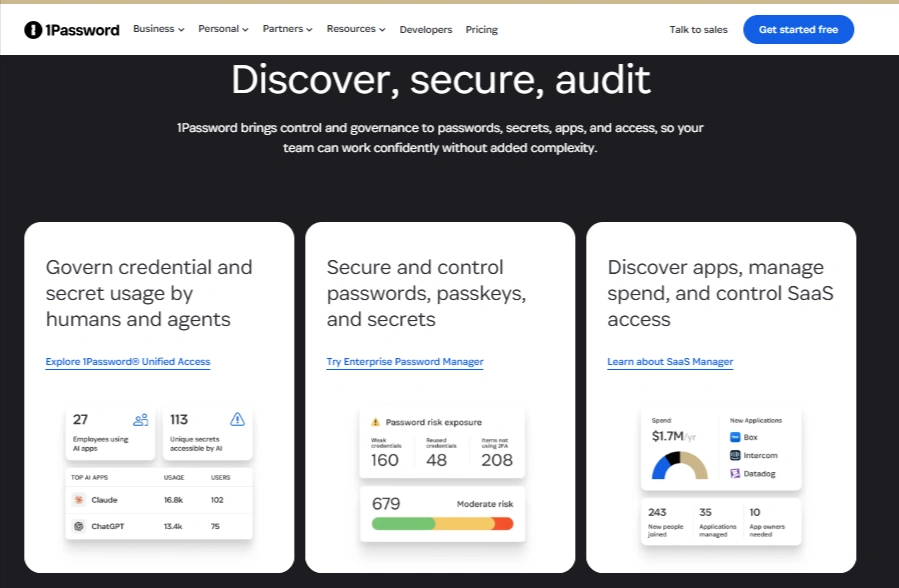
Your SaaS company is scaling beyond 20–30 people and you want one platform to handle passwords, passkeys, shadow IT discovery, device trust, and developer secrets.
You’re willing to pay slightly more per user for the polish, depth of integrations, and the peace of mind that comes with 180,000+ business customers behind the product.
You care about employee adoption and want a tool your whole team will actually enjoy using — from the engineering squad to the sales team.
The free Families add-on is also a surprisingly strong employee benefit for retention-focused culture. If you’re looking at the market leader that every major review in 2026 — from Wirecutter to ZDNET to PCMag — points to as the gold standard for business password management, this is it.
Choose Dashlane if:
Your SaaS company operates in a compliance-sensitive sector — fintech, health tech, or enterprise SaaS with demanding customers running their own vendor security assessments.
You want verifiable zero-knowledge guarantees (not just promises) around your SSO key management.
The Omnix platform’s proactive credential risk detection and AI-powered phishing alerts are compelling if you’re trying to build a proactive security posture rather than a reactive one.
Dashlane is also particularly strong if you’re already deep in the AWS ecosystem, since the Nitro Enclave architecture is tightly integrated there.
The higher Omnix price ($11/user/month) is justifiable if your alternative is hiring a dedicated security analyst to do manually what Omnix does automatically.
Choose Bitwarden if:
You’re a technical SaaS team — think developer-first company, open-source adjacent culture, or a startup that’s rigorous about security but equally rigorous about unit economics.
Bitwarden at $6/user/month Enterprise delivers SSO, SCIM, passkeys, SIEM integration, and solid compliance coverage at a price that’s hard to argue with.
If data sovereignty matters to your customers (or your enterprise sales process), the self-hosting option is a genuine competitive differentiator that neither 1Password nor Dashlane can offer.
The open-source codebase means your security team can audit the tool you’re trusting with your most sensitive credentials — and in a world post-LastPass breach, that transparency carries real weight.
Quick-Reference Decision Matrix for SaaS Teams
| Your Situation | Best Pick |
| Early-stage startup, ≤10 users, tight budget | Bitwarden Teams ($4/user/mo) |
| Growing SaaS, 11–50 users, want best UX | 1Password Business ($7.99/user/mo) |
| Compliance-heavy SaaS (SOC 2, HIPAA, etc.) | 1Password or Dashlane Omnix |
| Developer-first team, want CLI + secrets | 1Password (Secrets Automation) |
| Need self-hosting for data sovereignty | Bitwarden Enterprise |
| Open source transparency is non-negotiable | Bitwarden |
| AI-powered proactive security alerts | Dashlane Omnix |
| Enterprise with 100+ users, custom needs | 1Password Enterprise or Dashlane Enterprise |
| MSP managing multiple SaaS client accounts | 1Password MSP Edition |
What’s Changed in 2026: Features Worth Knowing
The password management space moved fast in the past 12 months. Here are the most important developments that affect your buying decision today:
1Password completed the integration of its Trelica acquisition for shadow IT discovery and fully embedded Kolide’s device trust capabilities — meaning your admin console now shows not just credential health but device health across your team. The Pasted Login Phishing Defense and Secure Agentic Autofill (for AI tools operating in browser environments) are 2026 additions that address genuinely new attack surfaces.
Dashlane launched the Omnix platform as its advanced enterprise tier, bringing AI-powered credential risk intelligence and automated Nudges. Its MCP (Model Context Protocol) server in beta allows AI assistants to safely query vault audit logs in a read-only, zero-knowledge-preserving way. Domain verification was decoupled from SSO setup, removing a meaningful admin friction point during onboarding.
Bitwarden launched Access Intelligence for credential risk management, achieved ISO 27001 certification, and — most significantly — partnered with Microsoft to enable native Windows 11 passkey login using vault-stored passkeys. This is the most dramatic platform integration of any password manager in 2026 and positions Bitwarden as the most aggressive mover on passwordless infrastructure.
Frequently Asked Questions
1. Can a password manager replace our SSO?
No, and they’re not trying to. A password manager handles credentials for apps that sit outside your SSO coverage — and in most SaaS companies, that’s still a significant chunk of your tool stack. The two work together: SSO covers the apps it can, and the password manager covers everything else while also integrating with your identity provider for provisioning.
2. Is the free tier of Bitwarden good enough for a small SaaS team?
For a very early-stage team (1–2 founders), Bitwarden’s free tier is decent. But as soon as you have more than two people sharing credentials, you need the Teams plan ($4/user/month) for proper sharing, admin controls, and policy enforcement. The free tier has meaningful limitations that matter in a business context.
3. How do these tools handle employee offboarding?
All three support automated deprovisioning via SCIM — when you deactivate a user in your identity provider, their vault access is immediately revoked. 1Password and Bitwarden also support vault transfer workflows, allowing admins to reassign departing employees’ credentials to successors securely.
4. What happens if the vendor gets breached?
All three use zero-knowledge encryption, so even if their servers were compromised, your encrypted vault data would be unreadable to attackers without your master password. 1Password’s additional Secret Key factor means attackers would need both your password and a previously trusted device. Bitwarden’s self-hosted option eliminates vendor-side breach risk entirely, since your data never leaves your infrastructure.
5. Do these tools support passkeys in 2026?
Yes, all three support passkey storage, sync, and autofill across major platforms. Bitwarden has gone furthest with Windows 11 OS-level passkey login. Dashlane offers the most secure architecture for passkey private key storage. 1Password is the only one that lets teams share passkeys between members.
Also Read:
- Best Customer Support Software
- Best Live Chat Software
- Best Proxies for Facebook
- Best Proxies for Streaming
- Best Proxies for Gaming
The Bottom Line
There’s no objectively “best” password manager for every SaaS company — but there is a best one for your company based on where you are and where you’re going.
If you’re scaling fast, care deeply about employee experience, and want one platform that grows with your security programme, 1Password is the safe and well-justified choice.
If you’re cost-conscious, technically sophisticated, and value transparency above polish, Bitwarden will likely surprise you with how much it delivers at its price point.
And if you’re building enterprise SaaS where every sales conversation eventually includes a security questionnaire, Dashlane’s Omnix tier gives you a genuinely differentiated security posture to talk about.
The worst decision you can make in 2026 is not picking one. Credential sprawl across your SaaS stack is not a hypothetical risk — it’s the leading cause of breaches across companies exactly like yours.
Pick the tool that fits, deploy it properly with SSO and SCIM, and actually get your team using it. That single move will do more for your security posture than most other investments you could make this quarter.
Comments
Be the first to leave a comment.