

If you landed here looking for a big Vizard AI coupon code, here is the honest picture before you go any further: the largest verified discount on Vizard right now is 5% off, available through a handful of community promo codes. There are no official 50% or 70% codes — those claims floating around third-party sites are not backed by anything verified. The real savings on Vizard come from choosing annual billing, which cuts your monthly cost almost in half compared to paying month by month.
This guide covers every verified deal available in September 2026, the exact pricing pulled directly from vizard.ai/pricing, how the credit system works, and which plan makes sense for your specific use case.
Best Available Deals — At a Glance

Annual Billing — Creator Plan
Save $145/year (~41% off monthly)
Annual Billing — Business Plan
Save $195/year (~41% off monthly)
Promo Code: MARIA
Watch your total drop of 5%off instantly.
Promo Code: CREATOR
5% off- Applied instantly on checkout to ensure you get the best possible value.
Promo Code: CRAFTO5
Enjoy an immediate 5% off on your total.
What Is Vizard AI? A Quick Overview
Vizard AI is an AI-powered video editing and repurposing platform built specifically for content creators, marketers, podcasters, and social media teams. Its core function is simple but powerful: you upload a long-form video — a podcast, a webinar, a YouTube video, an interview — and Vizard’s AI engine automatically identifies the best moments and cuts them into short, engaging clips ready for Instagram Reels, TikTok, YouTube Shorts, or LinkedIn.
Beyond automatic clipping, the platform handles auto-subtitling, subtitle translation, video resizing and reframing for different aspect ratios, AI emoji overlays, AI-generated B-rolls, direct social media scheduling, and team collaboration tools. The platform is rated 4.7–4.9 out of 5 across major review platforms including G2, Capterra, and Trustpilot, and is widely described as one of the most accessible AI video tools for non-editors who need professional-quality output without the learning curve.
The credit system is worth understanding before you commit to any plan. On Vizard, 1 credit = 1 minute of video uploaded. Every minute of footage you upload to the platform costs one credit, regardless of how many clips you generate from it. This means if you upload a 60-minute podcast, that costs 60 credits — and you can generate as many short clips as you want from that single upload.
Vizard AI Pricing Plans — September 2026
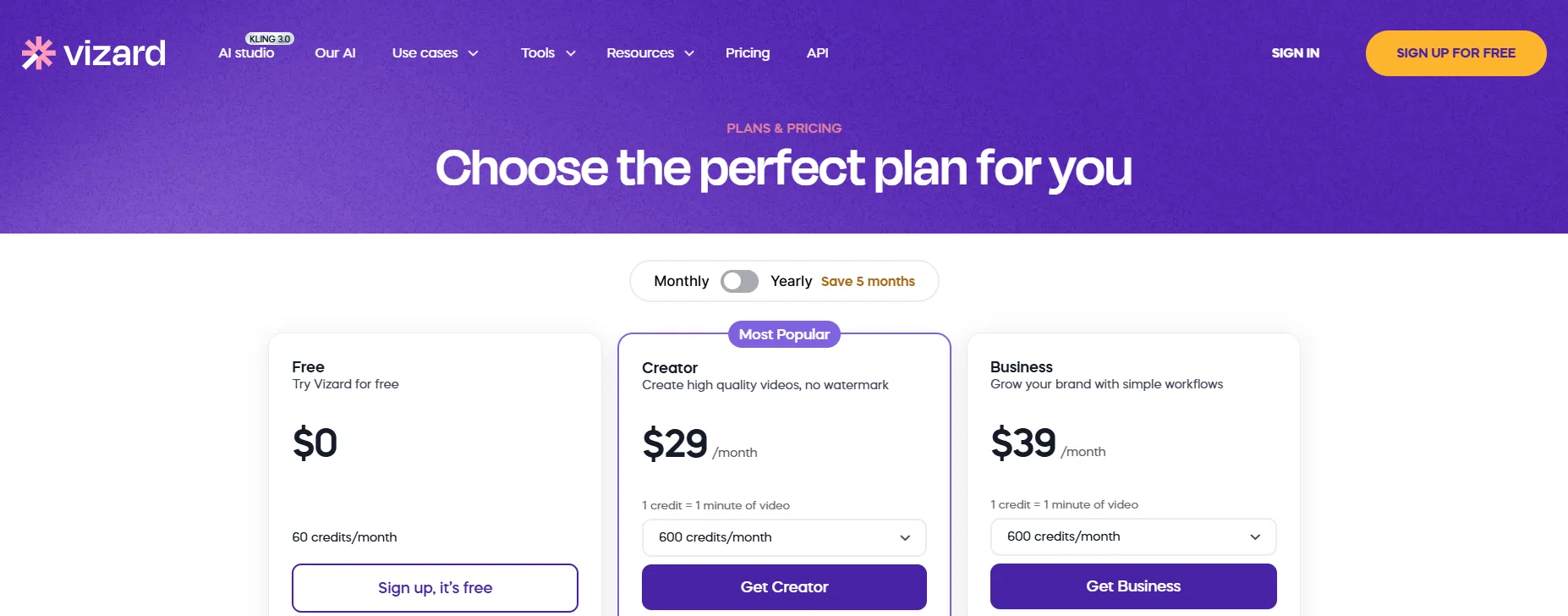
Plan | Monthly Price | Annual Price | Monthly Equivalent (Annual) | Credits | Best For |
Free | $0 | $0 | $0 | 60/month | Testing the platform, occasional casual use |
Creator | $29/mo | $203/yr | $16.90/mo | 600/month (base) | Individual creators, podcasters, solo marketers |
Business | $39/mo | $273/yr | $22.80/mo | 600/month (base) | Teams, agencies, brands needing collaboration |
Annual Savings — Calculated
Switching from monthly to annual billing is by far the most significant saving available on Vizard. Here is the exact difference:
Creator Annual Savings=($29×12)−$203=$348−$203=$145 saved per year
Business Annual Savings=($39×12)−$273=$468−$273=$195 saved per year
Choosing annual billing on the Business plan saves you $195 per year — equivalent to getting five months of the platform completely free compared to monthly billing. Vizard itself describes the annual plan as saving “5 months” on their pricing page, which reflects exactly this calculation.
Plan-by-Plan Breakdown
Free Plan — $0 Forever
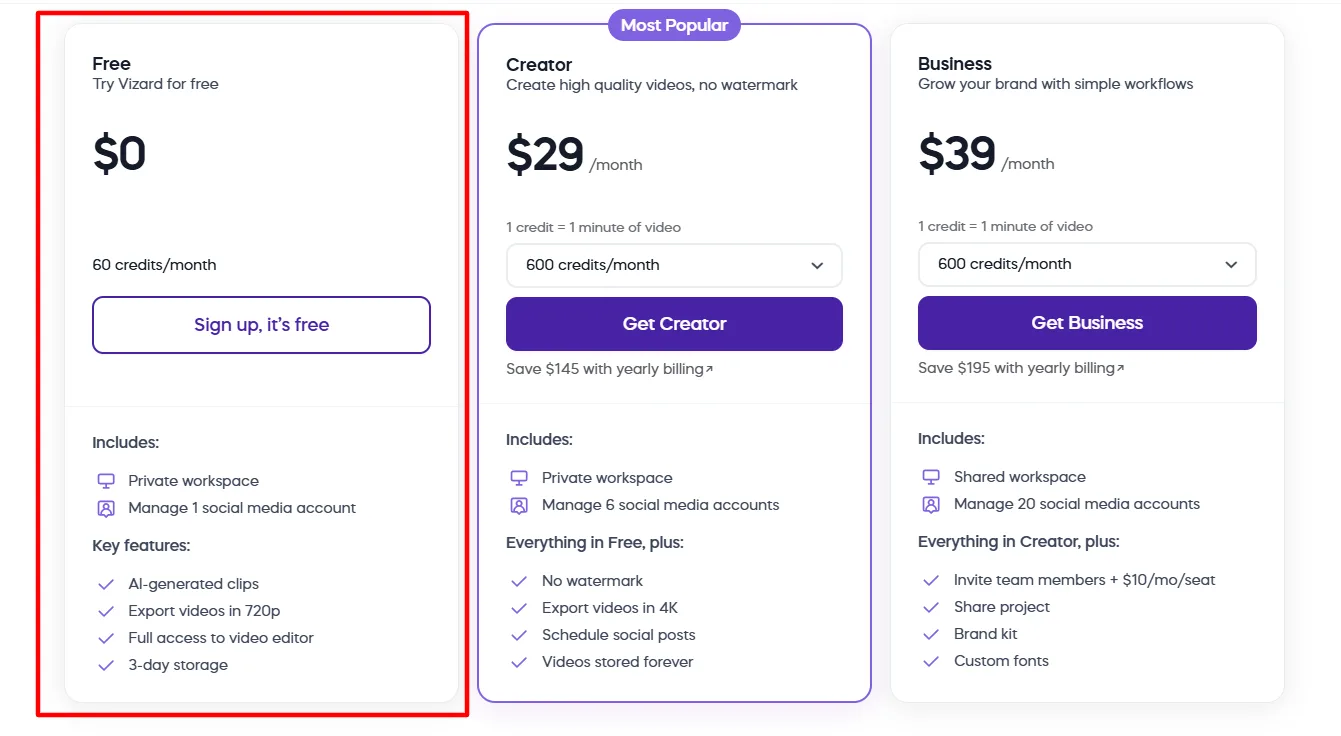
The Free plan is a legitimate, no-expiry tier that gives you real access to Vizard’s core AI features without a credit card. Here is exactly what is included:
Feature | Free Plan |
Monthly Credits | 60 (= 60 minutes of uploaded video) |
Upload Video Length | Up to 60 minutes per video |
Upload Video Size | Up to 1GB |
Upload Quality | Up to 1080p |
Export Quality | 720p |
Export Length | Up to 10 minutes per clip |
Video Storage | 3 days only |
Watermark | ✅ Watermark applied |
AI-Generated Clips | ✅ Included |
Auto Subtitling | ✅ Included |
Subtitle Translation | ✅ Included |
Full Video Editor Access | ✅ Included |
Social Media Accounts | 1 account |
Direct Publishing | ❌ Not available |
API Access | ✅ (1/min · 10/hour rate limit) |
Workspace | Private only |
The Free plan is the right starting point for anyone who wants to test whether Vizard’s AI clipping is genuinely useful for their content before spending anything. The key limitations are the 3-day storage window, the 720p export cap, the watermark on all exports, and the single social media account. Once you need watermark-free 4K exports or want to schedule posts directly, the Creator plan is the next step.
Creator Plan — $29/month or $16.90/month (Annual)
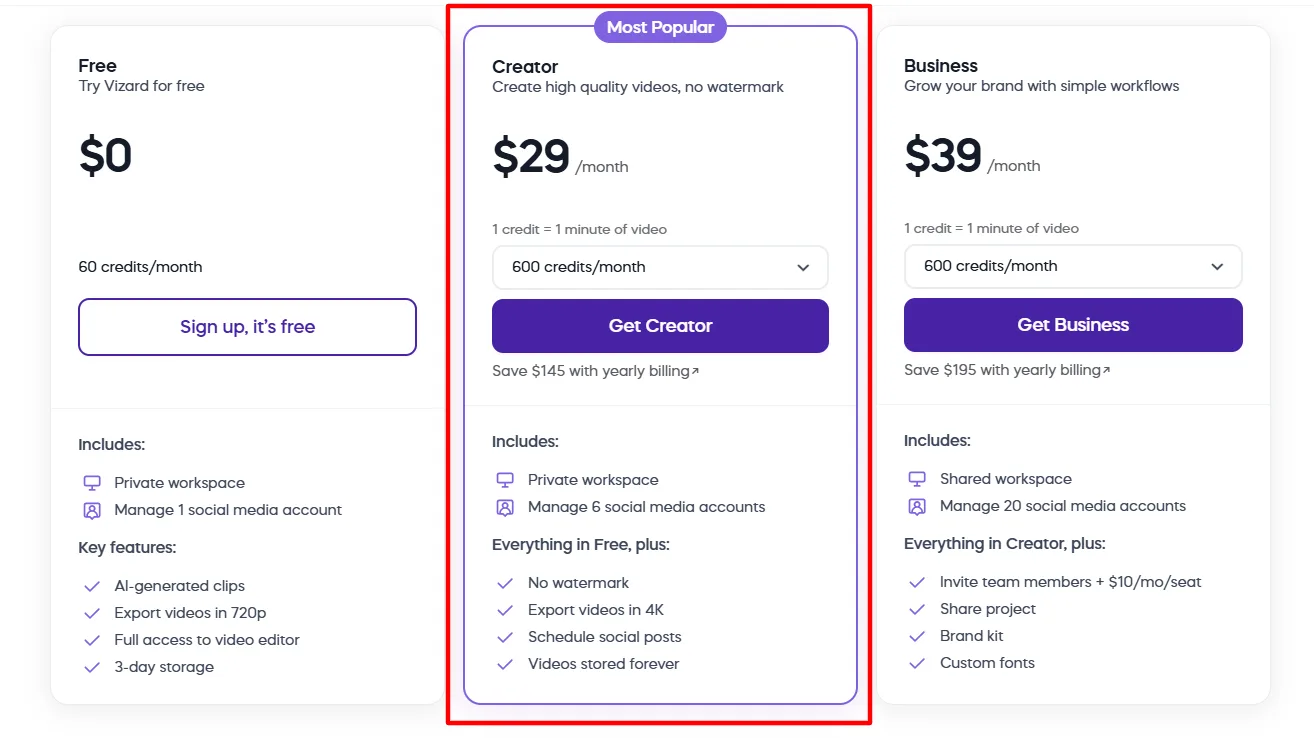
The Creator plan is Vizard’s most popular tier and the right choice for individual content creators, podcasters, coaches, and solo social media marketers who need professional-quality output regularly. It removes every meaningful limitation from the Free plan and adds direct social scheduling.
Feature | Creator Plan |
Monthly Credits | 600 (base) — scalable upward |
Upload Video Length | Up to 600 minutes per video |
Upload Video Size | Up to 10GB |
Upload Quality | Up to 4K |
Export Quality | Up to 4K |
Export Length | Any length |
Video Storage | Forever (while subscribed) |
Watermark | ❌ Removed |
AI-Generated Clips | ✅ Included |
Auto Subtitling | ✅ Included |
Subtitle Translation | ✅ Included |
Download Transcript | TXT and SRT formats |
Custom Outros | ✅ Included |
Custom Templates | ✅ Included |
AI Emojis | ✅ Included |
AI Highlight Keywords | ✅ Included |
AI B-Rolls | ✅ Included |
AI Post Suggestions | ✅ Included |
Direct Publishing | ✅ Included |
Social Media Accounts | Up to 6 accounts |
Schedule Social Posts | ✅ Included |
Save to Google Drive | ✅ Included |
API Access | ✅ (3/min · 20/hour rate limit) |
Workspace | Private only |
Team Members | ❌ Not available |
Brand Kit | ❌ Not available |
Business Plan — $39/month or $22.80/month (Annual)
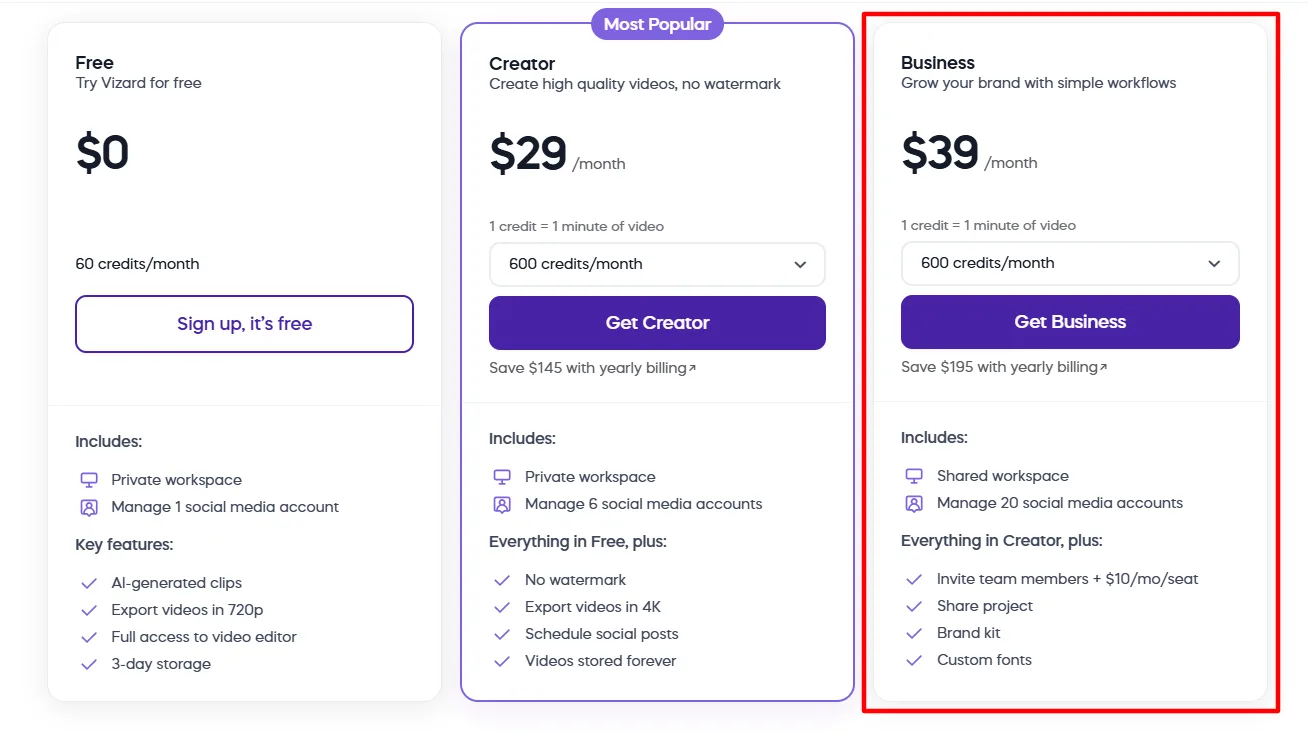
The Business plan is designed for teams, agencies, and brands that need collaborative workflows, brand consistency across multiple creators, and the ability to manage clients or external reviewers within the platform.
Feature | Business Plan |
Monthly Credits | 600 (base) — scalable upward |
Upload Video Length | Up to 600 minutes per video |
Upload Video Size | Up to 10GB |
Upload/Export Quality | Up to 4K |
Export Length | Any length |
Video Storage | Forever (while subscribed) |
Watermark | ❌ Removed |
All Creator AI Features | ✅ Fully included |
Social Media Accounts | Up to 20 accounts |
Direct Publishing | ✅ Included |
Schedule Social Posts | ✅ Included |
Workspace | Shared workspace |
Invite Team Members | ✅ (+$5/month per additional seat) |
Share Project | ✅ Included (add external viewers) |
Brand Kit | ✅ Included |
Custom Fonts | ✅ Included |
Brand Templates | ✅ Included |
API Access | ✅ (10/min · 60/hour rate limit) |
Live Chat Support | ✅ Included |
Priority Support | ✅ Included |
The two features that justify the Business plan over Creator are the shared workspace with team collaboration and the brand kit with custom fonts and brand templates. If you are managing content for multiple clients or need multiple creators working in the same environment with consistent branding, those features alone make the upgrade worthwhile — especially at only $5.90/month more than Creator on annual billing.
Full Feature Comparison Table
Feature | Free | Creator | Business |
Monthly Credits | 60 | 600+ | 600+ |
Upload Length | 60 min | 600 min | 600 min |
Upload Size | 1GB | 10GB | 10GB |
Export Quality | 720p | 4K | 4K |
Export Length | 10 min | Any | Any |
Video Storage | 3 days | Forever | Forever |
Watermark | ✅ Yes | ❌ No | ❌ No |
AI Clipping | ✅ | ✅ | ✅ |
Auto Subtitling | ✅ | ✅ | ✅ |
Subtitle Translation | ✅ | ✅ | ✅ |
AI B-Rolls | ❌ | ✅ | ✅ |
AI Post Suggestions | ❌ | ✅ | ✅ |
Custom Templates | ❌ | ✅ | ✅ |
Direct Publishing | ❌ | ✅ | ✅ |
Social Media Accounts | 1 | 6 | 20 |
Schedule Posts | ❌ | ✅ | ✅ |
Google Drive Save | ❌ | ✅ | ✅ |
Team Members | ❌ | ❌ | ✅ (+$5/seat) |
Shared Workspace | ❌ | ❌ | ✅ |
Brand Kit | ❌ | ❌ | ✅ |
Custom Fonts | ❌ | ❌ | ✅ |
Priority Support | ❌ | ❌ | ✅ |
API Rate Limit | 1/min · 10/hr | 3/min · 20/hr | 10/min · 60/hr |
How to Apply a Vizard Coupon Code — Step by Step
Unlike Systeme.io (which has no coupon field), Vizard does support promo codes at checkout. Here is exactly how to use one:
Step 1: Go to vizard.ai/pricing and choose your plan
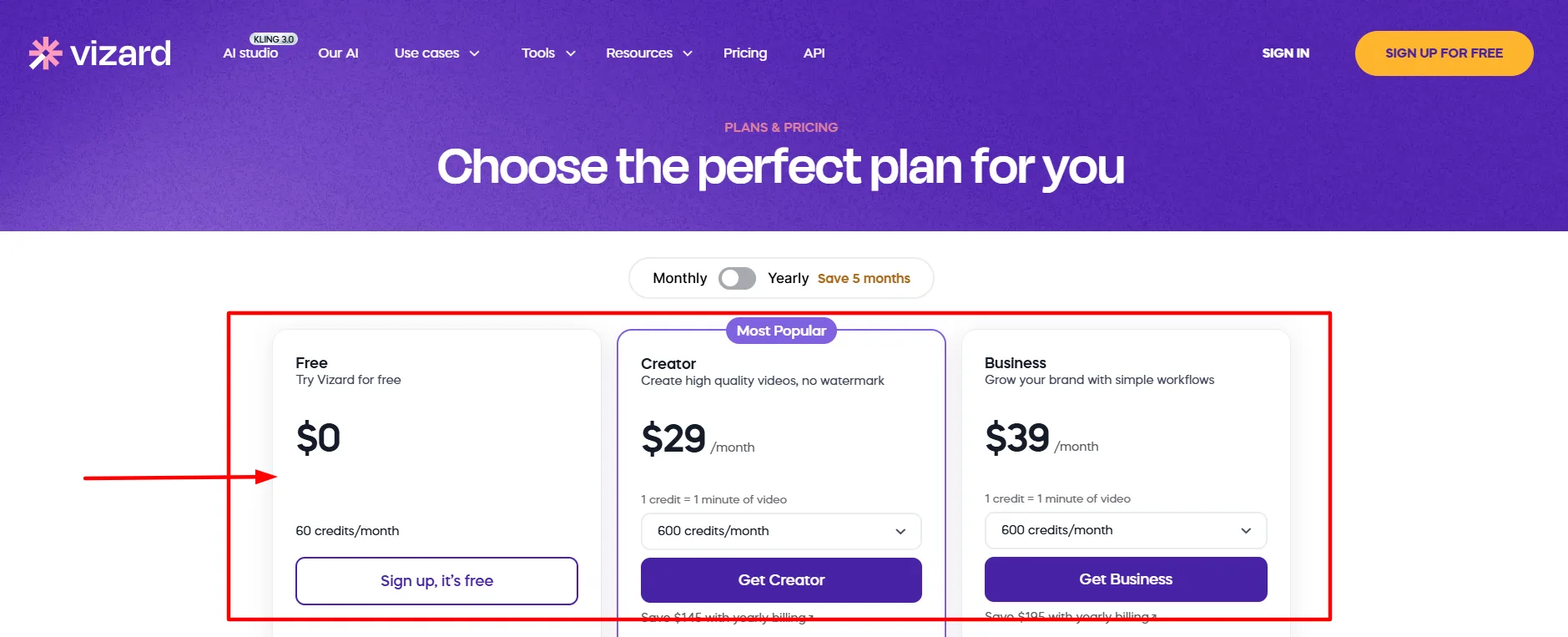
Step 2: Click “Get Creator” or “Get Business” to proceed to checkout
Step 3: Select Monthly or Annual billing (Annual recommended for maximum saving)
Step 4: At checkout, look for the promo code or discount code field
Step 5: Enter your code — MARIA, CREATOR, or CRAFTO5 for 5% off
Step 6: Verify the discount is applied before completing payment
Step 7: Complete checkout — payment is processed via Stripe (credit cards, PayPal, and bank transfers accepted)
If one code does not work, try the next. All three codes listed above have verified recent usage, but availability can change without notice.
What Vizard Does NOT Offer — Important to Know
Being honest about what is not available saves time:
❌ No large official discount codes — the 50%, 70%, or 78% codes promoted on YouTube and third-party sites are not verified by the platform and should be treated with significant skepticism
❌ No lifetime deal — Vizard does not offer a one-time payment option
❌ No free trial on paid plans — the Free plan serves this purpose with no time limit
❌ No student or nonprofit discount publicly available
❌ No money-back guarantee publicly stated — verify current refund terms at vizard.ai before purchasing
❌ PayPal not confirmed as accepted on all plans — Stripe is the primary processor
✅ Free plan never expires — the safest zero-risk way to start and evaluate the platform properly
Who Should Choose Which Plan?
The Free plan works well for anyone wanting to test whether Vizard’s AI clipping quality meets their standards before committing any money. The 60 credits per month (60 minutes of uploaded video) is enough to process one or two podcast episodes or webinars and see real output quality.
The Creator plan at $16.90/month on annual billing is the sweet spot for individual creators who are producing content consistently — podcasters turning episodes into clips, coaches repurposing webinars, or social media managers handling a single brand. Watermark removal, 4K export, forever storage, and direct social scheduling make this the practical workhorse plan.
The Business plan at $22.80/month on annual billing makes sense the moment you need more than one person working in the same workspace, need brand kit consistency across multiple pieces of content, or are managing more than six social media accounts. The $5.90/month jump from Creator to Business on annual billing is one of the more reasonable team-plan price differences in the AI tools market.
FAQ: Vizard AI Coupon Code September 2026
What is the best verified Vizard AI coupon code for September 2026?
The most consistently verified codes are MARIA, CREATOR, and CRAFTO5 — each offering 5% off. These have been confirmed working by multiple users within the last few months. Codes offering 50% or 70% off are circulating on third-party sites but are not officially verified and should be approached with caution.
How does Vizard’s credit system work exactly?
One credit equals one minute of video uploaded to the platform. If you upload a 45-minute podcast, that costs 45 credits. You can then generate as many short clips as you want from that single upload without any additional credit cost. The Free plan gives you 60 credits per month; the Creator and Business plans start at 600 credits per month and can be scaled higher.
Is the Vizard free plan genuinely free or does it expire?
It is permanently free with no expiry date and no credit card required. The main limitations are 60 credits per month, 720p export quality, a watermark on all exports, 3-day video storage, and access to only 1 social media account. For testing purposes it is fully functional.
How much do I save by choosing annual billing on Vizard?
On the Creator plan you save $145 per year ($29/month vs $16.90/month on annual). On the Business plan you save $195 per year ($39/month vs $22.80/month on annual). Vizard describes this as equivalent to getting 5 months free — which is the most significant discount available on the platform by a wide margin.
Can I stack a promo code with annual billing for extra savings?
Potentially yes — if the promo code field is active at checkout during annual billing selection, the 5% code would apply on top of the already-discounted annual price. Try entering the code after selecting annual billing and before completing payment to check.
What payment methods does Vizard accept?
Vizard uses Stripe as its payment processor. Credit cards are the primary accepted method. The platform’s FAQ also mentions PayPal and bank transfers as options, though availability can vary by region. Verify accepted methods at checkout before completing your purchase.
What is the difference between the Creator and Business plans beyond price?
The three key differences are: the Business plan includes a shared workspace allowing team collaboration, a brand kit with custom fonts and brand templates for consistent branding across all content, and support for up to 20 social media accounts compared to Creator’s 6. Additional team seats on Business cost $5/
Quick Links
Final Verdict: Vizard AI Coupon Code September 2026
The biggest saving on Vizard is not a coupon code — it is annual billing, which cuts Creator from $29/month down to $16.90/month and saves you $145 over the year. Try the community codes MARIA, CREATOR, or CRAFTO5 for an extra 5% at checkout, but do not wait for a bigger deal that is not coming. Start on the Free plan to validate the AI clipping quality, upgrade to Creator on annual when you are ready to go watermark-free, and get back the hours you are currently spending cutting clips manually.
Comments
Be the first to leave a comment.