

Quick Summary: Remote work is no longer a temporary adjustment — it is the default operating model for thousands of teams worldwide. But the tools you use make the difference between a team that thrives and one that burns out on endless calls and missed messages. Here are the best SaaS tools for remote teams in 2026, covering every part of how a distributed team works.
Why Remote Teams Need the Right Tools in 2026
Remote teams face three core challenges: communication gaps, collaboration friction, and productivity loss from context switching. The right SaaS stack solves all three. In 2026, the tools that lead this space are deeply AI-integrated, async-friendly, and built for teams spread across multiple time zones. Tools that required constant real-time interaction have been replaced by smarter platforms that keep everyone aligned without requiring everyone to be online at the same time.
According to multiple industry reports in 2026, teams that use a well-integrated remote SaaS stack report 40% fewer meetings and significantly faster project completion times. The tools below are the ones that actually make this happen.
Communication Tools
1. Slack — The Central Communication Hub
Price: Free | Pro: $7.25/user/month | Business+: $15/user/month
Slack is still the best messaging platform for remote teams in 2026. It organises conversations by channel, supports threaded replies, and keeps all your communication searchable. Slack AI now summarises long threads, highlights important messages you missed, and drafts replies for you. For a remote team dealing with multiple time zones, this is invaluable — you can catch up on an entire day’s conversation in two minutes.
Slack also connects to over 2,600 apps, which means your GitHub notifications, your Stripe alerts, and your Notion updates all land in one place.
2. Zoom Workplace — Video Meetings and More
Price: Free (40-min limit) | Pro: $15.99/user/month | Business: $21.99/user/month
Zoom is still the most reliable video call platform for remote teams in 2026. But it has evolved well beyond just meetings. Zoom Workplace now includes persistent team spaces, collaborative docs, AI-generated meeting summaries, and Zoom Clips for async video messages. The AI Companion feature takes notes, tracks action items, and suggests follow-ups automatically. For teams that cannot avoid meetings entirely, Zoom makes them significantly more efficient.
3. Loom — Cut Meetings with Async Video

Price: Free (25 videos) | Business: $15/user/month
Loom is the tool that remote teams use to replace unnecessary meetings with short video messages. You record your screen and voice, share the link, and the other person watches it on their own time. In 2026, Loom AI creates transcripts, generates summaries, and highlights action items from every recording automatically. Teams that adopt Loom seriously report eliminating 30 to 40 percent of their weekly meeting load.
Collaboration and Project Management Tools
4. Notion — Shared Workspace for Docs and Projects
Price: Free | Plus: $10/user/month | Business: $20/user/month
Notion serves as the digital headquarters for most high-performing remote teams. It holds your company wiki, project trackers, meeting notes, and team databases. Everyone on the team — no matter where they are — sees the same information at all times. Notion AI helps write, summarise, and translate content inside the workspace. For remote teams with members across different countries and languages, this is particularly powerful.
5. ClickUp — All-in-One Project Management
Price: Free | Unlimited: $7/user/month | Business: $12/user/month
ClickUp combines task management, time tracking, goals, docs, and chat in one platform. It is more complex than most tools, but that complexity pays off for remote teams managing multiple projects simultaneously. In 2026, ClickUp Brain (its AI assistant) auto-assigns tasks, predicts deadlines, and summarises project status. Remote teams managing client work, product sprints, and internal operations simultaneously tend to gravitate toward ClickUp.
6. Miro — Visual Collaboration and Brainstorming

Price: Free (3 boards) | Starter: $10/user/month | Business: $20/user/month
Miro is the online whiteboard that remote teams use for brainstorming, workshops, and visual planning. It supports sticky notes, flowcharts, wireframes, and mind maps that the whole team can work on simultaneously. In 2026, Miro AI can generate diagrams, suggest ideas, and convert sticky notes into structured documents. For creative or product teams, Miro replaces the in-person whiteboard session completely.
Productivity and Focus Tools
7. Notion Calendar — Smart Scheduling
Price: Free
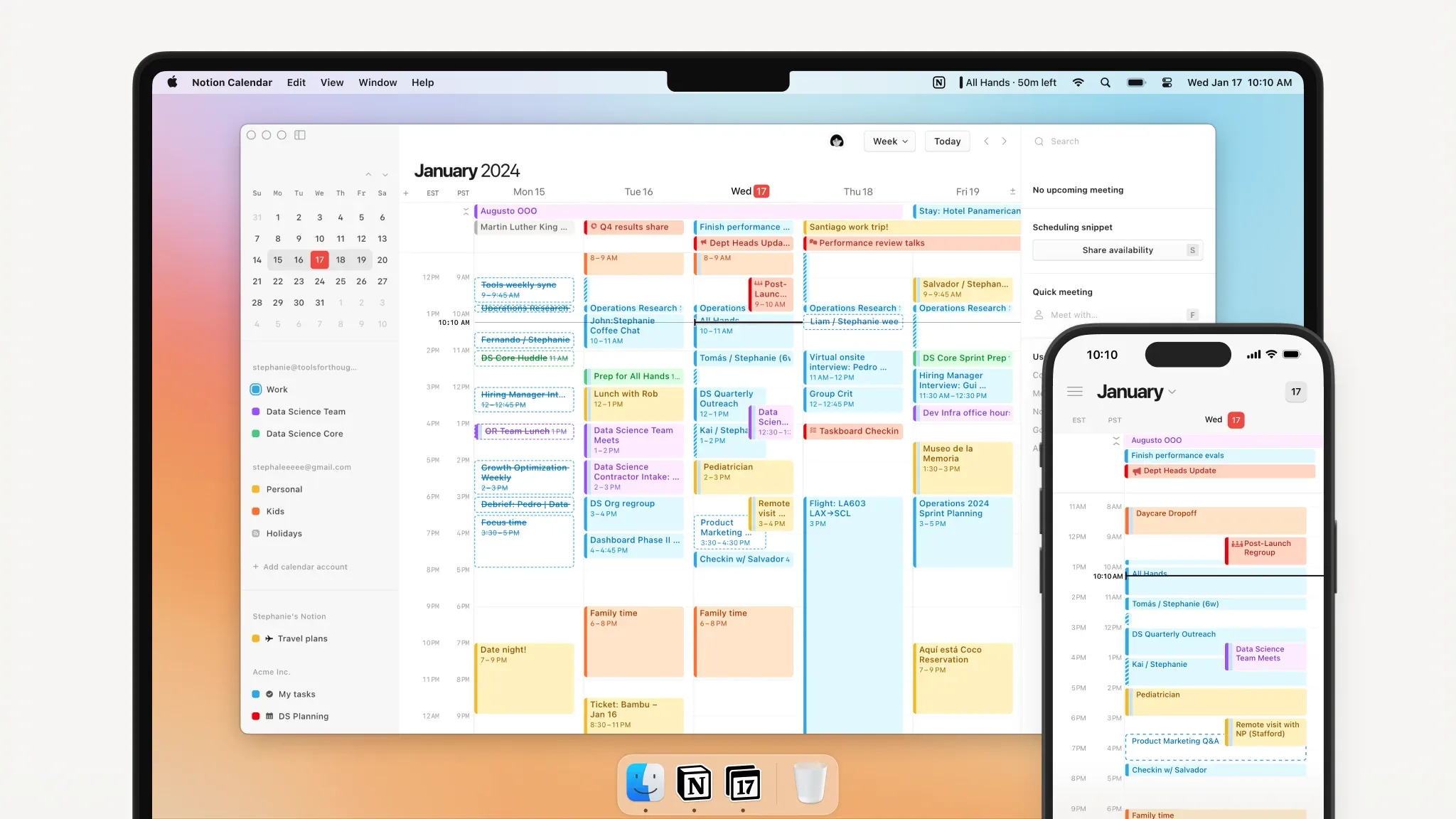
Notion Calendar (formerly Cron) is the cleanest calendar app for remote teams in 2026. It connects to Google Calendar, shows your tasks alongside your meetings, and blocks focus time automatically. It is the tool that helps remote workers own their schedule rather than letting meetings own them.
8. Clockify — Time Tracking for Remote Teams
Price: Free (unlimited users) | Basic: $4.99/user/month | Standard: $6.99/user/month
For remote teams that need to track how time is spent across projects, Clockify is the most affordable and capable option in 2026. It works across web, desktop, and mobile, integrates with most project management tools, and generates detailed reports by project, client, or team member. The free plan supports unlimited users, which makes it especially attractive for growing remote teams.
9. 1Password — Password and Security Management
Price: Teams: $4.99/user/month | Business: $7.99/user/month
Remote teams face a higher security risk than office teams because everyone works from different networks and devices. 1Password gives every team member a secure vault for passwords, credentials, and sensitive documents. Shared vaults let teams collaborate securely without ever emailing passwords. In 2026, 1Password has added passkey support and deeper browser integration, making it the most robust team security tool at this price.
10. Gather — Virtual Office for Remote Culture

Price: Free (up to 10 users) | Pro: $7/user/month
Gather creates a virtual office environment where remote team members can walk up to each other’s desks, have spontaneous conversations, and gather in meeting rooms — all inside a browser. It solves the biggest cultural problem with remote work: the lack of unplanned, human interaction. Teams that use Gather report stronger culture, faster onboarding, and less loneliness. It is one of the most underrated tools in the remote work stack.
The Full Remote Team Stack Cost (10-Person Team)
Slack Pro: $72.50/month
Zoom Pro: $159.90/month
Loom Business: $150/month
Notion Plus: $100/month
ClickUp Business: $120/month
Miro Starter: $100/month
Clockify Free: $0
1Password Teams: $49.90/month
Gather Pro: $70/month
Total: Approximately $822/month for 10 people — under $83 per person per month.
The Most Important Thing About Remote Team Tools in 2026
The tools do not matter as much as the habits around them. The best remote teams in 2026 use async communication as their default, reserve video calls for complex conversations, and document everything in a shared workspace. Pick tools that reinforce these habits, and your remote team will outperform most office-based teams every single day.
Final Thoughts: The Tools Are Only as Good as the Habits Around Them
Remote work in 2026 is not an experiment anymore. It is a proven, permanent way of working — and the companies that do it well consistently outperform those that treat it as a compromise. The tools in this guide give your remote team everything they need to communicate clearly, collaborate effectively, and stay productive without burning out on meetings or losing hours to context switching.
I wrote this guide because most remote team tool lists are built around what is popular rather than what actually works for distributed teams. There is a difference. A tool can have millions of users and still be wrong for a team spread across six time zones. Every tool in this guide was chosen because it is specifically suited to the realities of async-first, remote-first work — not just because it is well-known.
The most important thing to remember is this: tools do not fix culture problems. If your remote team struggles with communication, it is usually a process issue, not a tool issue. Get the habits right first — default to async, document decisions, over-communicate context — and then let the tools amplify those habits.
Frequently Asked Questions
This is a comprehensive solution designed to help you achieve better results.
Simply sign up, configure your settings, and start seeing results immediately.
Yes, we offer a 14-day free trial with full access to all features.
Comments
Be the first to leave a comment.