
Otter.ai hit $100 million in annual recurring revenue in March 2025. The company did it with fewer than 200 employees.
That’s over $500,000 in revenue per person. Those numbers tell you one thing — a lot of people pay for this tool. But should you?
Otter.ai is an AI meeting assistant. It records your meetings on Zoom, Google Meet, and Microsoft Teams. It transcribes them in real time.
It writes summaries. It pulls out action items. And it does all of this automatically while you focus on the conversation.
The question most people have isn’t whether Otter works. It’s whether the pricing makes sense for their situation. This guide breaks down every plan — what you get, what you don’t, and what each tier actually costs.
Otter.ai Pricing 2026: Four plans, One decision
Otter.ai offers four pricing tiers: Basic (Free), Pro, Business, and Enterprise.
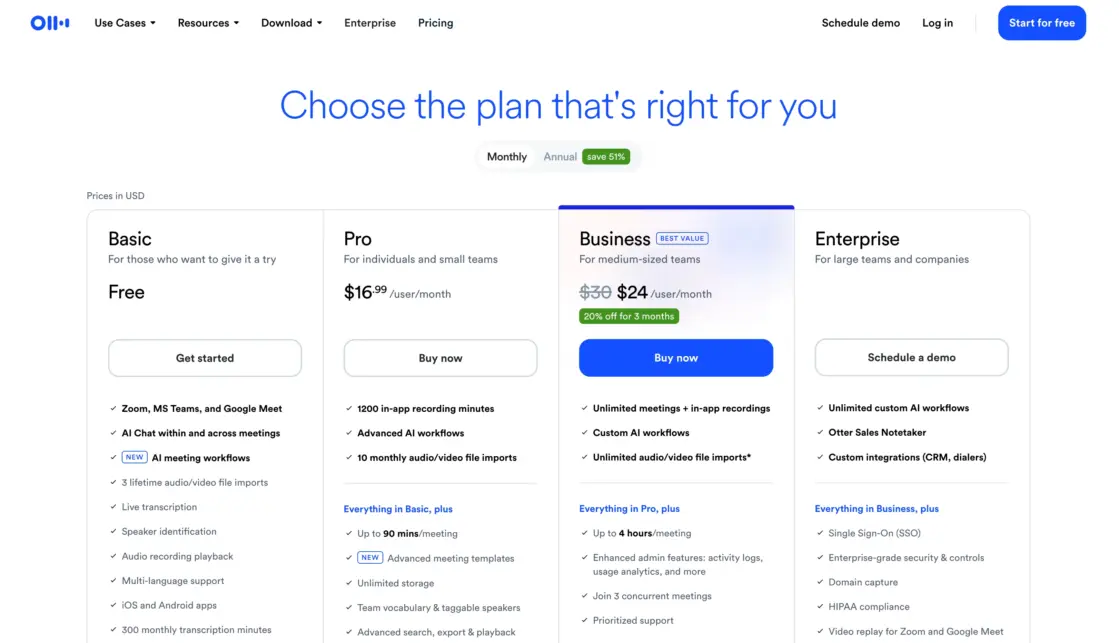
| Plan | Monthly Price | Annual Price (per month) | Transcription Minutes | Max Per Conversation | File Imports |
| Basic (Free) | $0 | $0 | 300 min/month | 30 minutes | 3 lifetime |
| Pro | $16.99/user | $8.33/user | 1,200 min/month | 90 minutes | 10/month |
| Business | $30/user | $20/user | 6,000 min/month | 4 hours | Unlimited |
| Enterprise | Custom | Custom | Unlimited | 4 hours | Unlimited |
Annual billing saves you roughly 50% on Pro and 33% on Business. That’s a significant difference. We’ll break that down later.
1. Basic (Free) — test it, don’t rely on it
The free plan gives you 300 transcription minutes per month. That’s a shared pool across all transcription types — meetings and imported files combined. Each conversation maxes out at 30 minutes.
You get real-time transcription in English, French, or Spanish. You get speaker identification. You get AI-generated summaries with action items.
Otter joins your Zoom, Teams, or Google Meet calls and automatically transcribes and writes notes. You can add up to 5 teammates to your workspace. You get basic collaboration features like editable text, annotations, highlights, and shared folders.
Here’s what you don’t get. You can only import 3 audio or video files — total, for the lifetime of your account. Your conversation history shows only your 25 most recent transcripts. Playback speed is locked at 1x. You can only run one concurrent meeting. Export is limited to mp3 and txt. And your Otter AI Chat is capped at 20 queries per month (3 per conversation).
The 30-minute cap is the real problem. Most business meetings run 45–60 minutes. If your meeting goes past 30 minutes, the transcription stops. You don’t get the rest. That makes the free plan nearly useless for professional use.
Use Basic if: You want to test Otter before paying. You have short meetings under 30 minutes. You just need a quick feel for how the transcription works.
Skip Basic if: Your meetings regularly run longer than 30 minutes. You need to import more than 3 files. You want reliable, daily meeting transcription.
2. Pro ($16.99/month or $8.33/month annual) — the individual workhorse
Pro is where Otter becomes a real tool. You get 1,200 transcription minutes per month. That’s 20 hours of meetings. Each conversation can run up to 90 minutes. You can import and transcribe 10 audio or video files per month.
Pro unlocks several features you don’t get on Free. Advanced search lets you filter by speaker, date range, and keywords. You get variable playback speeds — 0.5x to 3x plus silence skip. Export options expand to mp3, txt, pdf, docx, and srt.
Custom vocabulary goes from 5 terms to 100 names plus 100 other terms. You can run 2 concurrent meetings. And your AI Chat limit jumps to 50 queries per month.
You also get enhanced collaboration — shared custom vocabulary across your team, speaker tagging, and action item assignments. Conversation history becomes unlimited.
The 1,200-minute math. If your average meeting is 45 minutes, Pro gives you about 26 meetings per month. That’s roughly 6 per week. For most individual users, that’s enough. For heavy meeting schedules (8+ meetings a week), you’ll run short.
Use Pro if: You’re an individual professional or part of a small team. You have 4–6 meetings per week. You need searchable, exportable transcripts. You want clean summaries with action items.
Skip Pro if: You manage a larger team and need admin controls. You have more than 6 meetings per week. You need more than 1,200 minutes per month.
3. Business ($30/month or $20/month annual) — built for teams
Business is Otter’s team plan. You get 6,000 transcription minutes per month. That’s 100 hours. Each conversation can run up to 4 hours. File imports are unlimited. You can run 3 concurrent meetings.
Business adds administrative features that Pro doesn’t have. Usage analytics let you track how your team uses Otter. You get prioritized email support.
Centralized billing and user management make it easier to handle a team of up to 25 billed users. You get activity logs, domain capture, centralized conversation management, and recording control permissions. Custom vocabulary expands to 800 names plus 800 other terms at the team level.
You also get bulk export in all formats — mp3, txt, pdf, docx, and srt. Your AI Chat limit doubles to 200 queries per month. And you get a custom notetaker name for virtual meetings.
Two-factor authentication supports authenticator apps and SMS for US and Canada users. Recording disclaimer emails let you notify meeting participants about the transcription.
The 6,000-minute math. If you have a team of 10 and each person averages 5 meetings per week at 45 minutes each, that’s about 9,000 minutes per month.
You’d exceed the 6,000-minute cap. For smaller teams (5–8 people with moderate meeting loads), it works well. For larger teams, you’ll need Enterprise.
Use Business if: You manage a team of 5–15 people. You need admin controls and usage analytics. You want centralized billing and user management. Your team conducts moderate-to-heavy meeting schedules.
Skip Business if: You’re a solo user — Pro covers you at a fraction of the cost. Your team exceeds 25 people or burns through 6,000+ minutes monthly. You need SSO, HIPAA compliance, or sales-specific features.
4. Enterprise (Custom pricing) — the full package
Enterprise is Otter’s top tier. Pricing is custom — you have to contact sales for a quote. It includes everything in Business plus several exclusive features.
Enterprise unlocks Single Sign-On (SSO) with a minimum 100-user license requirement. You get HIPAA compliance for healthcare and regulated industries.
Workspace size is unlimited. You get organization-wide deployment, domain capture, and advanced security controls.
The biggest Enterprise-exclusive feature is sales tooling. OtterPilot for Sales extracts sales insights, syncs notes to Salesforce or HubSpot, centralizes customer calls, and provides live call guidance and coaching. You also get video replay for Zoom, Google Meet, and Microsoft Teams — a feature not available on any other plan.
Enterprise also supports live transcription via RTMP for additional fees. This is useful for webinars, live events, and broadcast workflows.
Use Enterprise if: You’re a large organization with 100+ users. You need SSO and HIPAA compliance. Your sales team needs CRM-integrated call intelligence. You want video replay, not just audio transcription.
Skip Enterprise if: You’re a small-to-mid team. The Business plan covers your needs. You don’t need SSO or compliance features.
Annual vs Monthly: The Real Savings
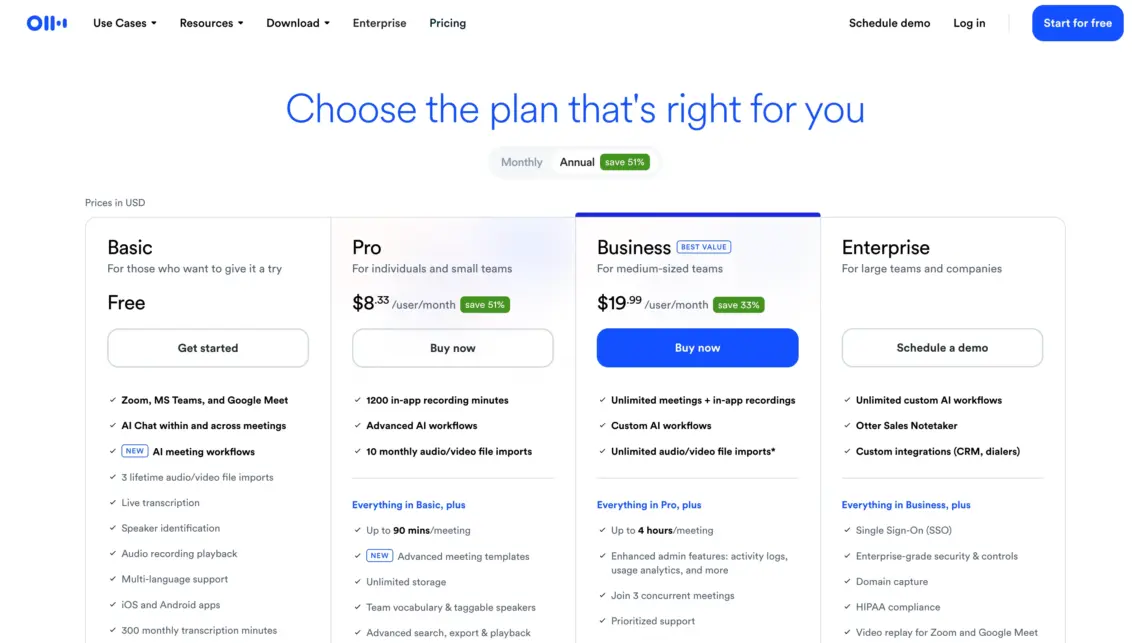
Annual billing on Otter.ai saves you serious money. Here’s the breakdown:
| Plan | Monthly Billing (per year) | Annual Billing (per year) | You Save |
| Pro | $203.88/user | $99.96/user | $103.92 (51%) |
| Business | $360/user | $240/user | $120 (33%) |
Pro saves you over 50% on annual billing. That’s the biggest percentage discount Otter offers. Business saves a third. These are per-user savings — multiply by your team size and the numbers get significant fast.
For a 10-person Business team, annual billing saves $1,200 per year compared to monthly.
Student and Teacher Discount
Otter offers a 20% discount on the Pro plan for students and teachers. You need an email address ending in .edu. The discounted prices are $6.67/month on annual billing and $13.59/month on monthly billing.
This discount applies only to the individual Pro plan. It doesn’t work for Business or Enterprise.
Sign up with your .edu email, go to Settings, click Upgrade Plan, and look for the Student & Teacher Discount link at the bottom of the page.
Frequently Asked Questions
How many transcription minutes do I really need?
A 45-minute meeting uses 45 minutes from your pool. If you average 5 meetings per week, that’s about 900 minutes per month. Pro’s 1,200 minutes covers that with room to spare. If you have 8+ meetings per week, you need Business.
Can I roll over unused minutes?
No. Otter’s minutes don’t roll over. Whatever you don’t use in a billing cycle is gone. Budget carefully.
What languages does Otter support?
English, French, and Spanish only. If you need transcription in other languages, Otter isn’t the right tool.
Does the free plan really cap at 30 minutes per conversation?
Yes. If your meeting runs 31 minutes, the transcription cuts off at 30. You lose everything after that point. This is the single biggest limitation of the free plan.
Can I try Pro before committing?
Otter doesn’t always offer a free trial for Pro, but the free plan lets you test the core experience. The main upgrades on Pro are longer conversations, more minutes, and better export options.
Also Read:
Bottom line
Otter.ai’s pricing rewards annual commitment and penalizes monthly billing—especially on Pro, where the gap is over 50%.
The free plan is suitable for testing, but is not suitable for real work due to the 30-minute cap. Pro at $8.33/month (annual) is the sweet spot for individuals. Business at $20/user/month (annual) serves teams of 5–15 well. Enterprise is for large organizations that need SSO, compliance, and sales tooling.
Know your meeting volume. Count your minutes. Choose accordingly.
Comments
Be the first to leave a comment.